

How to Add an Addon Domain in cPanel
You can add an additional domain to your cPanel account using the Domains section.
Access Addon Domains
Log in to cPanel
Log in to your cPanel account.
Open Addon Domains
In the Domains section, click Addon Domains.
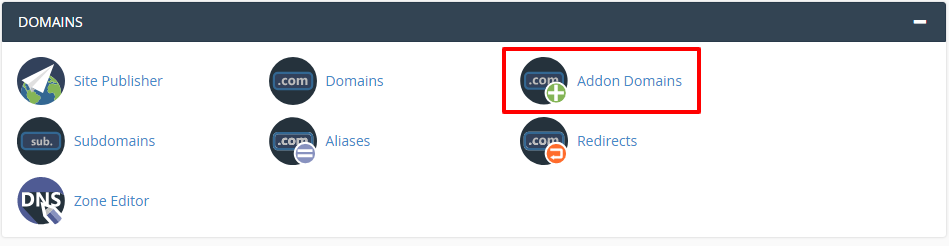
Create an Addon Domain
Enter the domain details
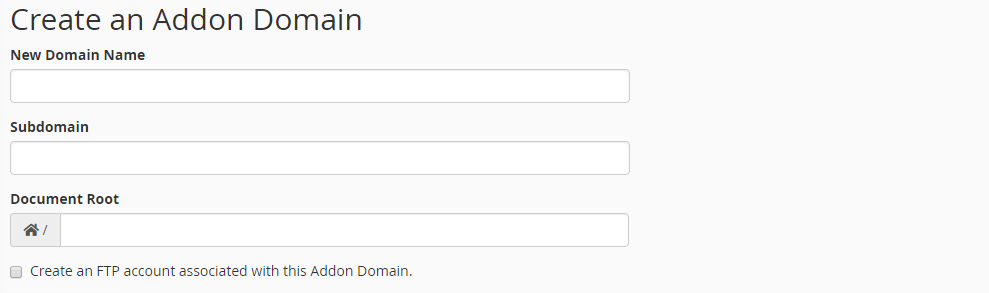
In the Addon Domains section, enter the required domain details.
- New Domain Name: Enter the domain name you want to add as an addon domain.
- Subdomain: This will be filled automatically.
- Document Root: This will be filled automatically.
Create an FTP Account
If you want to create an FTP account for the addon domain, follow these steps.
Enable FTP account creation
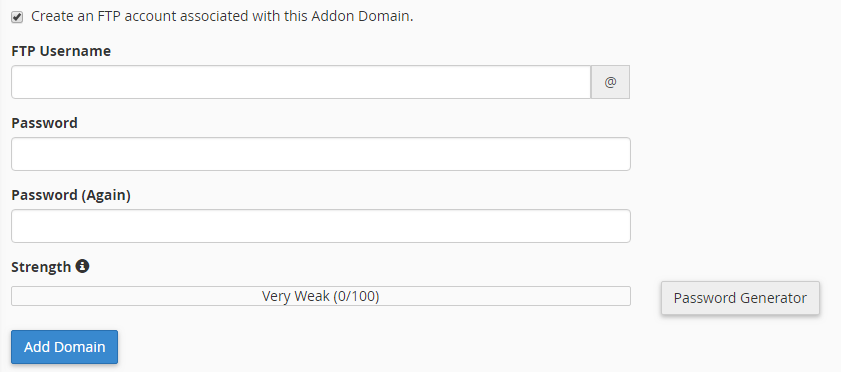
Select Create an FTP account associated with this Addon Domain.
Enter the FTP account details
The following fields will be displayed:
- FTP Username: This will be filled automatically.
- Password: Enter a strong password.
- Password (Again): Re-enter the password.
Warning
Use a strong password for the FTP account and keep the credentials secure.
Add the Domain
Create the addon domain
Click Add Domain to create the addon domain.
Your domain has now been added successfully. You can upload your website files using FTP.