

How to Create an FTP Account in cPanel
You can create an FTP account in cPanel to allow users to connect to your hosting account and manage files using FTP.
Access FTP Accounts
Log in to cPanel
Log in to your cPanel account.
Open FTP Accounts
In the Files section, click FTP Accounts.
Create an FTP Account
Enter the account details
Enter the required Username, Password, and Directory for the new FTP account.
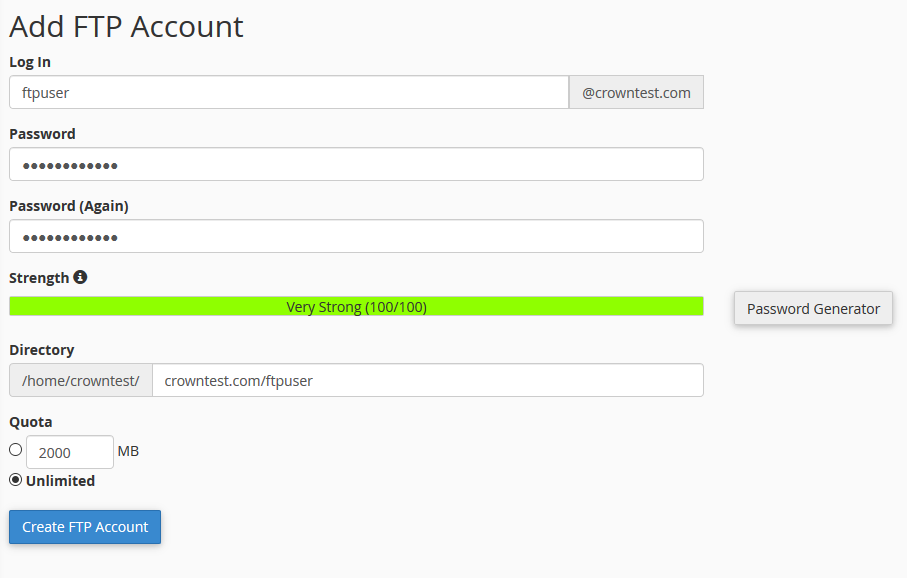
Important: Use a strong password for the FTP account and make sure the directory is set to the appropriate location.
View the FTP Account
Verify the account
Once the FTP account is created, it will be listed under the FTP Accounts section.
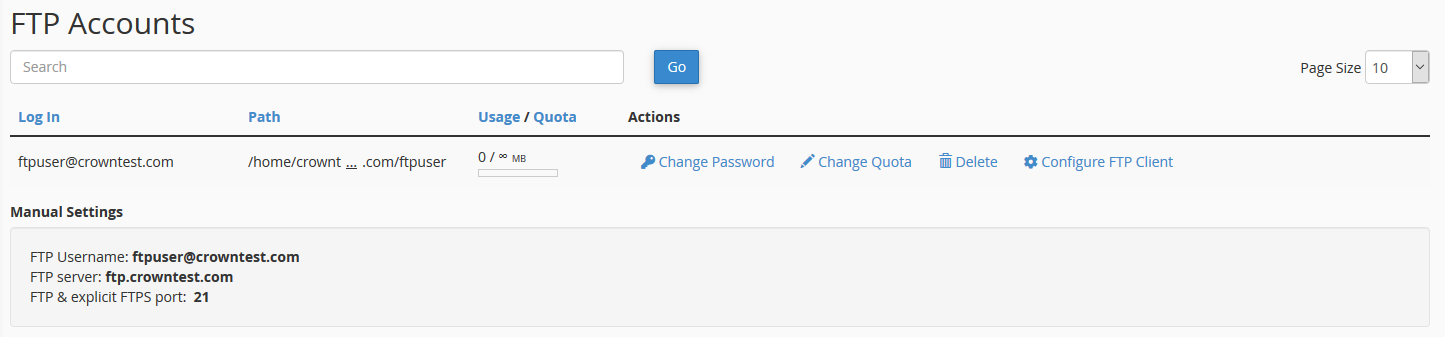
Configure the FTP Client
View the connection settings
Click Configure FTP Client next to the FTP account to view the connection settings required to connect to the account.
Connect using an FTP client
Use these details in an FTP client to connect to your hosting account.
Keep your FTP connection details secure and do not share the account password with unauthorized users.
Your FTP account has now been successfully created.