

How to Create a Catch-All Email Address in cPanel
What is a Catch-All Email Address?
A catch-all email address is a default email address that captures emails sent to invalid or non-existent email addresses under your domain. This helps you avoid missing emails sent to mistyped or non-existent addresses.
Prerequisites
- Access to cPanel with the correct login credentials.
- A domain already set up in your cPanel account.
Log in to cPanel
Open cPanel
Open your web browser and navigate to your cPanel URL (e.g., https://yourdomain.com/cpanel).
Log in to your account
Enter your username and password, then click Login.
Locate the Email Section
Find the Email section
Once logged in, scroll down to find the Email section.
Open Default Address
Click Default Address (sometimes listed as "Catch-All Email").
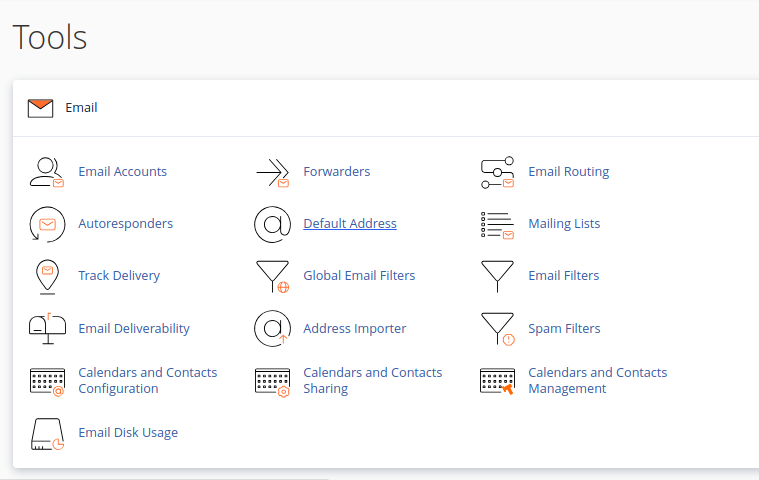
Set Up the Catch-All Email
Select the domain
On the Default Address page, select the domain for which you want to set up the catch-all email from the dropdown menu.
Configure the forwarding address
Select Forward to Email Address and enter an email address where all misdirected emails will be forwarded.
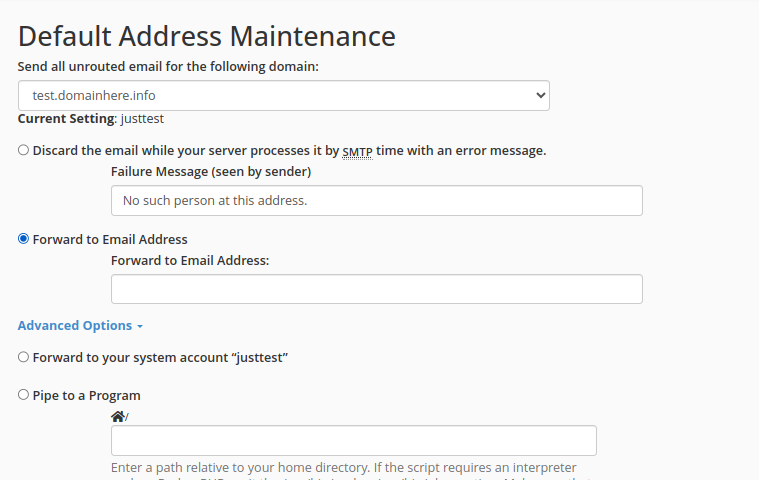
Configure the handling of invalid addresses
Alternatively, select Discard with Error to Sender (at SMTP time) if you prefer not to receive emails for invalid addresses and want to send a bounce-back error.
Enter the email address or error message, depending on your choice.
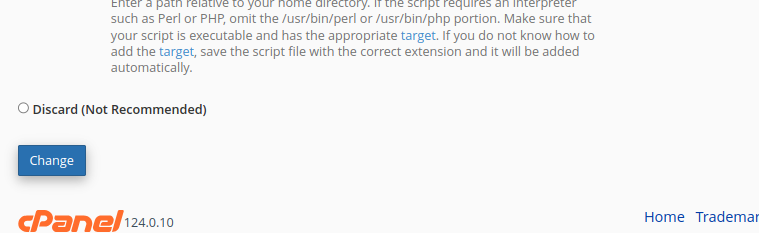
Save the changes
Click the Change or Save button at the bottom of the page to finalize your setup.
Be cautious when enabling a catch-all address, as it may receive a large amount of spam sent to invalid email addresses.
Test the Catch-All Email
Send a test email
Send a test email to a non-existent address under your domain (e.g., test@yourdomain.com).
Verify email delivery
Check the catch-all email inbox to verify that the email has been received.
Enabling a catch-all email address can increase the amount of spam delivered to the configured mailbox.
Summary
By setting up a catch-all email address, you can capture misdirected emails sent to your domain. This is especially useful for businesses or websites to ensure they don't miss any important communication. However, be cautious of potential spam if you enable this feature.